From Lokko Wiki, the free Lokko encyclopedia

Track Level Editor (Labs)

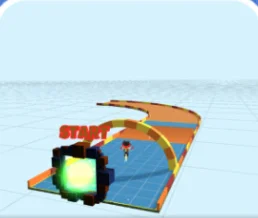
Track Level Editor is an experimental mode in LABS, Lokko's playground for new game modes. Build your own track, starting from the START gate.

Controls

Choose your platform
PlayStation controls
Fly aroundLeft stick
Fly up / down✕/△
Place piece (hold to paint)R2
Delete pieceL2
Change vehicle (car / pod)L1
Test drive / back to editingNot available
Xbox controls
Fly aroundLeft stick
Fly up / downA/Y
Place piece (hold to paint)RT
Delete pieceLT
Change vehicle (car / pod)LB
Test drive / back to editingNot available
Keyboard & Mouse controls
Fly aroundWASD
Fly up / downSpace/Ctrl
Place piece (hold to paint)Left Click
Delete pieceRight Click
Change vehicle (car / pod)Tab
Test drive / back to editingP
Touch controls
Fly aroundMove stick
Fly up / downUp/Down buttons
Place piece (hold to paint)Place button
Delete pieceDelete button
Change vehicle (car / pod)Not available
Test drive / back to editingNot available

All controls: CONTROLS.

In Action

What You Do

  • Lay out a track from the START gate, with curves and ramps.
  • See Track Editor for the main track-building tool.

Try It

Track Level Editor is in LABS in the game. Labs modes are experimental, so they may change. Try it and tell us what you think on Discord.