From Lokko Wiki, the free Lokko encyclopedia
Cube Gun
Contents
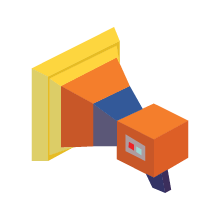
The Cube Gun lets you create and delete cubes with ease. It's the basic building tool in both of Lokko's Level Editors, and usually the first thing you use when you start a new level. It's also a power-up you can place in 3D levels, letting players create cubes to make their way around. In CO-OP, one player uses it to place cubes for their partner on the Co-Op Robot.
Controls
As a power-up
On a controller the Cube Gun uses the triggers, not ◯ / B.
In the 3D Editor
All controls: CONTROLS.
In Action
 Video coming soon
How It Works
- Aim where you want a cube and create it, or remove cubes with the death ray.
- It works the same way in the 2D Editor and the 3D Editor. In 3D you place cubes in three dimensions instead of on a flat grid.
- In CO-OP, one player drives the Co-Op Robot while the other uses the Cube Gun to clear the way.
Tips
- Start with a rough layout of cubes before adding platforms, spikes or enemies on top.
- Use the Move Gun to reposition cubes you've already placed, instead of deleting and re-placing them.